
Biomine Console is an AI operations platform: IT department, software house and DevOps team in the same Docker container.
A company that runs on IT needs many trades: sysadmins, developers, a DevOps team, people who look after network, storage, and GPUs. Around them, functions that live on documents and deadlines: compliance, legal, marketing, finance. Every trade has its own tools, its own credentials, its own commands. Nobody knows them all.
See it in action on the dedicated site: console.biomine.it.
Every day someone has to provision a VM, configure a VLAN, check a Dell server via iDRAC, add a DNS record — and then develop, test, release, and deploy to bare metal and cloud. Operations that require jumping between different interfaces, remembering incompatible syntaxes, and managing credentials scattered across many systems.
The gap is not in observation — many platforms see everything but cannot act. The gap is not even in automation — many frameworks act but without security guarantees, without RBAC, without an audit trail, without understanding what a VLAN, an iDRAC, or an IPsec tunnel actually is.
Biomine Console fills this gap. It is not another monitoring dashboard and not a generic chatbot: it is an AI operations platform. The same Docker container is an IT department, a software house, and a DevOps team: it creates projects, develops, tests, releases, deploys to bare metal and cloud, and manages network, storage, and GPUs. And with a skill it becomes any other business function: legal and compliance, marketing, finance, technical expert opinions.
What Is Biomine Console
Biomine Console is an AI operations platform that uses Claude Code (Anthropic) as its engine. It ships as a stateless Docker image: one container per user, with SSH key-based identity, encrypted credentials, role-based access control, and a cryptographic audit log.
What it does depends on its skills: instructions, tools, and permissions that turn a session into a role. Skills for infrastructure, development, and release are ready out of the box; whoever writes a new one gets a new function. The limit is this: any function that can be described in a skill.
> BIOMINE CONSOLE v4.0.721
> SYSTEM INITIALIZED

  SSH key    operator@company.com     OK
  Secrets    47 credentials           OK
  RBAC       role: admin              OK
  Inventory  synced                   OK
  Tools      ready                    OK
  MCP        ~100 tools registered    OK

> Create an Ubuntu VM with 4 CPUs on ESXi
> _
The operator asks in natural language. The Console translates into concrete operations: full provisioning with DHCP, DNS, VM creation, network configuration. Every action tracked, verifiable, reversible.
It is not a SaaS. It is not a generic chatbot. It is an operational terminal that knows your company — because infrastructure, projects, and rules are described in a structured inventory that the AI references on every operation.
Every AI session is also self-aware: it knows its own cluster, the reachable peer nodes, the available sub-commands, and its own operational boundaries. No blind actions — the AI always knows where it is and what it can do.
The Real Advantage: AI That Develops Its Own Tools
Most infrastructure management platforms ship with a fixed list of integrations. They support VMware, AWS, Azure — and if you have a device not on the list, you wait for the vendor to add it. Or write a custom script that nobody will maintain.
Biomine Console works differently. The AI does not just use existing tools — it creates new ones during live operations.
When an operator encounters an unsupported system, the Console:
- Analyzes the system (Does it have an API? A CLI? A communication protocol?)
- Writes a complete Python tool (with tests, documentation, CLI interface)
- Integrates it into the shared tool library
- Redistributes it to all customers through the update mechanism
This means the tool library does not grow with product releases. It grows with every deployment, every customer, every new system encountered. As of today, the library includes 149 Python tools alongside about 100 MCP tools registered in the daemon, covering a wide range of system types — from Cisco and MikroTik routers to Dell iDRAC servers, from VMware and Proxmox hypervisors to Tasmota and Modbus IoT devices, from Arista EOS switches to Juniper gear, from FRR dynamic routing daemons to Altivar and Modbus industrial control systems, all the way to GPU monitoring in co-location facilities (see also Biomine’s new extreme computing infrastructure). For example, a telco operator managing Juniper devices today generates a tool that tomorrow is available to an MSP managing data centers. It is a network effect applied to infrastructure automation. A concrete example is the case study on LoRaWAN decoders written by AI.
Traditional monitoring platforms observe but do not act. Generic AI frameworks act but without security, without RBAC, without infrastructure domain knowledge. Biomine Console does both, and does it securely.
How It Works
Dedicated Deployment
Installation is fully on-prem. A main repository is created on the customer’s own Git server — conventionally named *-ops (e.g. biomine-ops, acme-ops) — which acts as the orchestrator. All components are linked inside it as Git submodules: the tool library, the infrastructure inventory, encrypted credentials, operational templates, prompts, and the console itself.
This submodule architecture means each component has its own lifecycle, permissions, and Git history — but the *-ops repository holds them together in a single, coherent entry point. Platform updates arrive as submodule updates, without touching customer data.
The Console ships as a Docker container that operates directly on the customer’s network. All you need is a Linux host with Docker installed. No additional dependencies, no agents to install on managed devices, inventory and credentials stay inside the corporate perimeter.
Your SSH Key Is Your Identity
Biomine Console has no passwords. Your Ed25519 SSH key simultaneously serves as:
- Authentication: identifies who you are (via the Git user associated with the key)
- Authorization: determines what you can do (RBAC maps your identity to permissions)
- Decryption: accesses infrastructure secrets (the SSH key is converted to age format for SOPS)
One key. Zero passwords to manage. Zero tokens to rotate manually.
The Git email is the universal user identifier, while the SSH fingerprint (immutable and unspoofable) is the RBAC lookup key. Each user can have multiple SSH keys tied to the same identity — for example, one for their laptop and one for their workstation — all sharing the same permissions and the same credential domain access.
One Container Per User
Each operator works in their own isolated Docker container. Stateless: destroy and recreate without consequences. Data persists in the user volume, not the container. Updates are a docker pull — no installer, no migration.
The BYOK (Bring Your Own Key) model means each operator uses their own Anthropic API key. AI costs are transparent and direct — Biomine does not act as a middleman. Automatic per-task model routing assigns each operation the best-fit model — deep reasoning, standard development, or mechanical operations — optimizing quality and cost with no operator intervention. The default model is Opus 5.5, with Fable 5.1 reserved for deep reasoning.
Enterprise Security: Defense in Depth
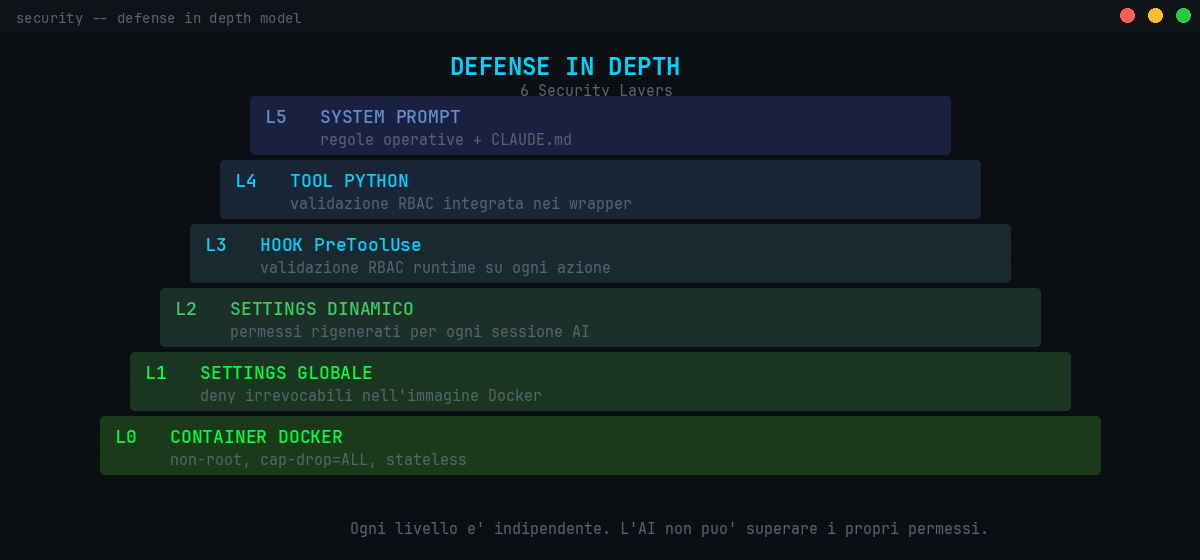
Biomine Console is built on six independent security layers, each one enforcing constraints regardless of the others. Security is not a layer added on top — it is the architecture itself.
  DEFENSE IN DEPTH
  ================

  L5  System Prompt + CLAUDE.md      operational rules
  L4  Python Tool wrappers           built-in RBAC validation
  L3  PreToolUse Hooks               runtime validation
  L2  Dynamic Settings               per-session permissions
  L1  Global Settings                immutable deny rules
  L0  Docker Container               non-root, cap-drop=ALL
The AI cannot exceed its permissions — even if instructed to. An operator with a “network” role cannot touch databases. A “read-only” operator cannot modify anything. Every action is logged to a cryptographic audit trail (SQLCipher), queryable and exportable.
Infrastructure credentials are encrypted with SOPS/age — decryptable only by authorized SSH keys. No plaintext passwords on disk, ever.
The Console implements a Plan → Review → Execute flow for all potentially destructive operations. The AI generates an operational plan, presents it to the user for review, and proceeds only after explicit confirmation. No server is shut down, no volume deleted, no DNS record removed without the operator seeing and approving every single step.
Credentials follow a three-layer architecture: the user’s SSH key decrypts their personal keyring, which contains the keys for authorized functional domains (network, compute, services, tokens), which in turn decrypt the actual credentials. A network operator cannot even attempt to decrypt database credentials — not because it is forbidden, but because they physically do not possess the cryptographic key.
The Console integrates the latest Claude Code mitigations: deny rules that resist wrapping with env/sudo/watch, network sandbox active by default with no silent bypass, and a 1-hour prompt cache that dramatically cuts AI costs on the long sessions typical of infrastructure work. The bubblewrap kernel-level sandbox isolates every AI session from the host system at zero overhead, and the unified audit (RFC 3339 timestamps, event-driven taxonomy) is ready for ingestion in any existing observability stack — Elastic, Splunk, Loki, Grafana — without data transformation.
Data-loss prevention: secrets — tokens, keys, passwords — are automatically redacted both in tool output and in the AI’s own messages, before they ever reach the model context.
Operator confirmation on persistence vectors: any edit to shell startup files (.bashrc, .zshrc), .gitconfig, or git hooks — the typical channels for persistent cross-session code execution — goes through explicit approval, not a blind deny.
MCP: Your Infrastructure, Accessible to Any AI — and Federated Across Sites
Biomine Console exposes its tools as an MCP server (Model Context Protocol). This means any MCP-compatible AI client — Claude Desktop, IDE plugins, third-party tools — can access the Console’s infrastructure tools securely. About 100 MCP tools organized in 14 domain modules (development, audit, console, credentials, inventory, logs, memory, repository, coordination, tracker, guardrails, spoke, cluster topology, subscription) are available immediately, with Bearer HMAC authentication.
An architect working in Claude Desktop can query the corporate inventory. An AI-based alerting system can execute corrective actions automatically. All through the same RBAC security layer.
The MCP server is mounted directly inside the orchestrator daemon (HTTP loopback 127.0.0.1:7891), eliminating additional latency hops and enabling a cross-session subscription mechanism: the TUI can subscribe to GitLab pipeline events, log_bus, modal, worker, audit — and receive real-time notifications even from other sessions. Your infrastructure becomes reactive, not just queryable.
And for those managing multiple distributed sites — an MSP with data centers, branch offices, co-location facilities — the Console offers cross-cluster MCP federation. A single orchestrator cluster_id can federate the MCP tools of N remote sites while preserving RBAC isolation for each tenant. One secure tunnel, one entry point, cryptographic isolation. If you are interested in how AI is transforming software development, MCP represents the next step: AI that does not just write code, but directly operates infrastructure — and across multiple sites simultaneously.
Beyond CLI: The Dynamic TUI Engine
Biomine Console is not just a terminal. It is a Dynamic TUI (DTUI) — a full-featured text-based user interface built on declarative .bc* configuration files, a theme engine, and Python providers.
The Console offers a complete set of operational capabilities:
- DynApp Framework: declarative TUI applications defined by
.bcmanifest files and backed by Python providers. The framework includes reactive pub/sub ViewContext, interactive widgets (tree, list, input), provider hot-reload, and an interaction layer with RBAC pre-dispatch validation - Help Explorer as a built-in DynApp: the Console documentation itself is implemented as a DynApp — full dogfooding that proves the framework’s maturity for production applications
- Layout Engine with SplitPane: multiple panes side-by-side in the same window, with full state restore across Console upgrades
- DevTools Control Panel: built-in actions for diagnostics, maintenance, and troubleshooting, with real-time AI metrics (session cost, context usage, cache hit rate) read from the Claude Code transcript, and one-click AI escalation for complex issues
- /tail sidepane with log_colorizer: an integrated sidepane displays logs with contextual coloring through a plugin architecture (seven built-in styles plus a composable filter chain) and automatic scan_anomalies — operators see errors before they become incidents
- Customizable statusline: interactive widgets, contextual badges, session indicators, and system health markers
- Universal auto-upgrade: registry check via read-only deploy token, works on any installation regardless of the internal Git server configuration
- Session persistence: sessions survive container restarts, with full state restore including scroll position, command history, active split panes, and context — even across a Console upgrade
- Bidirectional session sync: seamless state synchronization across Claude Code, Console TUI, and tmux sessions
- Batch AI Runner: execute AI tasks across multiple targets with real-time streaming output
- Isolated credential input: when a credential is not yet in SOPS, the prompt happens in a popup separate from the AI session, with immediate encrypted save — the password never enters the model context
The test suite covers the full stack with over 38,000 automated tests (console and tool library) distributed across more than 2,000 files, from tool internals to TUI rendering, DynApp framework, RBAC policy evaluation, the integrated MCP server, and the unified audit.
Angels: an Operating Philosophy
Angels are not a number: they are a philosophy. An angel is a specialized AI role that each installation defines as it likes, by combining three elements: a skill (what it knows how to do), a mailbox (how it receives and sends messages), and an RBAC perimeter (what it may touch).
Real uses show the range: audit and ISO compliance documentation, console development and debugging, issue triage and fixes, multi-customer provisioning, business plans and market analysis, accounting and financial statements, party-appointed technical expert work in a dispute, SD-WAN and CPE, marketing, website and SEO.
Several roles work in parallel on the same repository and coordinate through explicit mechanisms: a mailbox with delivery acknowledgement, locks with expiry (leases), a shared work board, delegation between roles and, for sensitive actions, a human gate via Telegram with TOTP.
Recent Updates (as of 7 November 2026): Telegram Gate, Signed Supply Chain
Since June 2026, 445 releases have shipped in 150 days. Sensitive actions are approved from a phone through the Telegram gate: the operator receives the request, confirms it with a TOTP code, and the system issues a single-use token valid for 300 seconds (the gateway is off by default). A tmux status bar shows, for each session, whether it is waiting, working, silent, or possibly stuck.
On multi-site, the hub-and-spoke tunnel between consoles is now end-to-end encrypted (AES-256-GCM, with anti-replay protection): federated tools pass only through an allowlist and every call is audited. On the supply chain, biomine-* packages come only from the registry with sha256 verification, the release manifest is signed with Ed25519, the image is pinned by digest, and the trivy scan blocks the pipeline on HIGH/CRITICAL vulnerabilities that have a fix. Every day the CVE watch cross-checks the real versions of inventoried assets against the CISA KEV catalog and public vulnerability databases, and also alerts via Telegram. The L1 layer counts 87 deny rules.
Enterprise Bootstrap: From Zero to Production in Days
The Console is an operational platform that self-deploys. Onboarding a new customer takes days, not weeks of manual setup:
- Automatic
.bc*templates: an empty*-opsrepository, on first container launch, is automatically populated with pre-configured files — contextual sidebars, main views, themes, example providers. Operators meet a functional platform, not a blank canvas to configure. - Unified admin onboarding: adding a new administrator is a single call that orchestrates personal keyring creation, RBAC registration, SOPS recipient addition, and age key generation. Zero ad-hoc scripts, zero manual configuration scattered across multiple files.
biomine.console.opspackage: four atomic, idempotent modules (secrets_ops,keypair_ops,sops_ops,keyring_ops) exposing the bootstrap engine as a reusable Python API. The onboarding code shrank considerably, eliminating typical boilerplate.- 165-check audit framework, including the automatic cross-layer verification of the consistency between
config/admins.yaml, SOPS keyring, age keys declared in.sops.yaml, RBAC, and tool permissions. Catches the “credentials encrypted but nobody can decrypt them” case before it becomes an operational incident.
Concrete result: in onboardings at telecommunications operators with multi-vendor infrastructure (core, radio, backhaul, servers, hypervisors, AD/DNS), most of the time goes into integrating with the customer’s systems, not configuring the Console.
Architecture: Deterministic Recovery
The orchestrator is built around a platform-agnostic pid1 supervisor — the only process authorized to spawn components. Each service (orchestrator, dropbear SSH, MCP tunnel, observability) is declared as a Service registered with the supervisor, with defined soft-fail policies, tracked lifecycles, and a strict shutdown protocol. Recovery is deterministic: the supervisor knows exactly which process must be reborn, in what order, with what configuration.
For the operator this translates to one thing: if something goes wrong, the Console comes back up on its own, predictably, without manual intervention. Sessions preserved, data intact, state coherent.
The Network Effect
Biomine Console’s development model rests on a cycle that benefits every customer.
Each customer works on a private fork of the tool library. When the AI develops a new tool or extends an existing one, the code is proposed as a Merge Request to Biomine. After review and testing, the tool is redistributed to all customers.
More customers means more tools. More tools means more infrastructure scenarios covered. It is a virtuous cycle where every deployment enriches the ecosystem for everyone.
The important thing is that this process is continuous and organic. There is no need to wait for a release. No need to file feature requests. The AI encounters a problem, generates the solution, and the solution becomes shared knowledge.

Who Is Already Using It
Biomine Console is not a theoretical project. It is in production.
Biomine uses it daily on its own multi-site infrastructure — data centers, remote offices, co-location facilities — and on its own work: from VM provisioning to AI-powered real-time monitoring, from network configuration to software development and release.
In production at several telecommunications operators and companies: tens of thousands of devices, appliances, and networks, core and data centers managed by the same console. Every new system they meet generates new tools, which enrich the platform for everyone.
The network effect is not a plan for the future. It is already active.
The Proof: Facts in the Repositories
No need to take our word for it: the numbers are in the repositories (as of 7 November 2026). 445 releases in 150 days, 380 merge requests in the tool library since June 10, over 5,600 commits in the operations repository, 165 automated audit checks.
This article, the presentation decks, and the website’s SEO audit were produced by the Console itself, on the same day it fixed four defects in its own WordPress tool. The Console wrote this article.
Who Is Biomine Console For
Companies that want an IT department, a software house, and a DevOps team in the same container, and other functions whenever they are needed. From SMBs with a few servers to multi-datacenter enterprises. From cloud service providers to telco operators.
If your infrastructure is fragmented across different vendors, if your teams waste time jumping between incompatible tools, if you want AI to work for you with the same security guarantees you expect from a human operator, and if a business function can be described in a skill — Biomine Console is the answer.
Get Started
Onboarding starts from your company: we map your systems, configure permissions, choose the first skills, and within days you have an AI terminal that knows your devices and your processes.
Want to learn more? Contact us for a personalized demo or to discuss your infrastructure scenario.
To get to know the Console up close, visit the dedicated site: console.biomine.it.
Biomine Console is a product of Biomine S.r.l. — an AI operations platform for infrastructure and business.